Bilbory's Silent Band

Developed for heavy sleepers, by heavy sleepers

100% wake-up guarantee, even for the heaviest sleepers

Wakes you up without disturbing others
Couldn't load pickup availability

Collapsible content
Will this actually wake me up?
Yes — our band is specifically engineered to wake up even the heaviest sleepers, without noise.
It uses a strong, steadily increasing vibration intensity that becomes more powerful until you wake up. This makes it ideal if you’ve always struggled to wake up, sleep through alarms, hit snooze without noticing, or need something that works every time.
Because it vibrates directly on your wrist, your brain can’t “tune it out” like it does with sound.
Who is this band perfect for?
- Heavy sleepers who don’t wake up to normal alarms.
- People who oversleep, snooze too much, or miss morning alarms.
- Couples who need a completely silent wake-up without disturbing their partner.
- Students and professionals who must wake up on time for classes, shifts, or exams.
- People with ADHD or irregular sleep who struggle to wake up with sound.
- Hearing-impaired sleepers who need a reliable vibration alarm.
- Anyone who wants to wake up calmly, without loud, stressful noises.
How it Works?
Our band wakes you up using a silent vibration alarm that activates directly on your wrist — no sound, no noise, and no phone connection required.
Once your set wake-up time arrives, the band starts with a gentle vibration and gradually increases the intensity until you fully wake up. This progressive pattern makes it highly effective even for deep sleepers, because the vibration is felt directly on your skin and your brain can’t just “tune it out” like a normal sound alarm.
It works completely independently, without Bluetooth, apps, or pairing.
Just set your wake-up time on the device, wear it on your wrist, and sleep.
+10,000 satisfied customers
Silence the Noise, Stop the Stress
Bilbory's Band wakes you with gentle wrist vibrations—no noise, no distractions. Comfortable, discreet, and effective, it helps you start the day without disturbing anyone.
Stories of Better Mornings
What makes Bilbory's band different?
Easy Setup Guide
Setting time & personal data
Turn on your FitSleeper by pressing the button once. You will now see the time to be adjusted. Press and hold the button for 3 seconds to start the adjustment process, first the “hour” indicator will begin to flash. Use the button to set the hour, then press the button again for 3 seconds to switch to the “minutes.” Repeat this process to set the minutes, month, day and year. You can also choose between a 12-hour or 24-hour clock format.
After setting the time and date, the device will ask you to enter your height and weight. Hold the button down until the corresponding indicator flashes and then use the button to adjust these values.
After completing all settings, do not press any more buttons for 8 seconds; the FitSleeper will save the data and return to standby mode. Thus, your device is fully set up and ready to use!
Setting the Alarm
- Alarm Set: To set the alarm clock, press the button 5 times to display the first alarm group. If “A1 OF” is displayed, it means the alarm clock is off by default. To turn it on, press and hold the button for 3 seconds. The hour begins to flash - press the button to set the hour. Once the hour is set, press and hold the button again to switch to the minutes. After setting the minutes, press and hold the button again for 3 seconds to save the alarm. The alarm is now activated.
Note: Once you set the alarm clock, it will go off at the same time every day until you turn it off or adjust it yourself. This is useful if you have a fixed alarm time; you then only have to set the alarm once.
To set additional alarms, press the button 6, or 7 times to access the other alarm groups and follow the same procedure.
- Alarm off: To turn the alarm off, navigate to the set alarm by pressing the button the appropriate number of times. Once the alarm is displayed, press and hold the button for 3 seconds and then press the button again until “A1 OF” appears, then press and hold the button for 3 seconds and the alarm is turned off again.
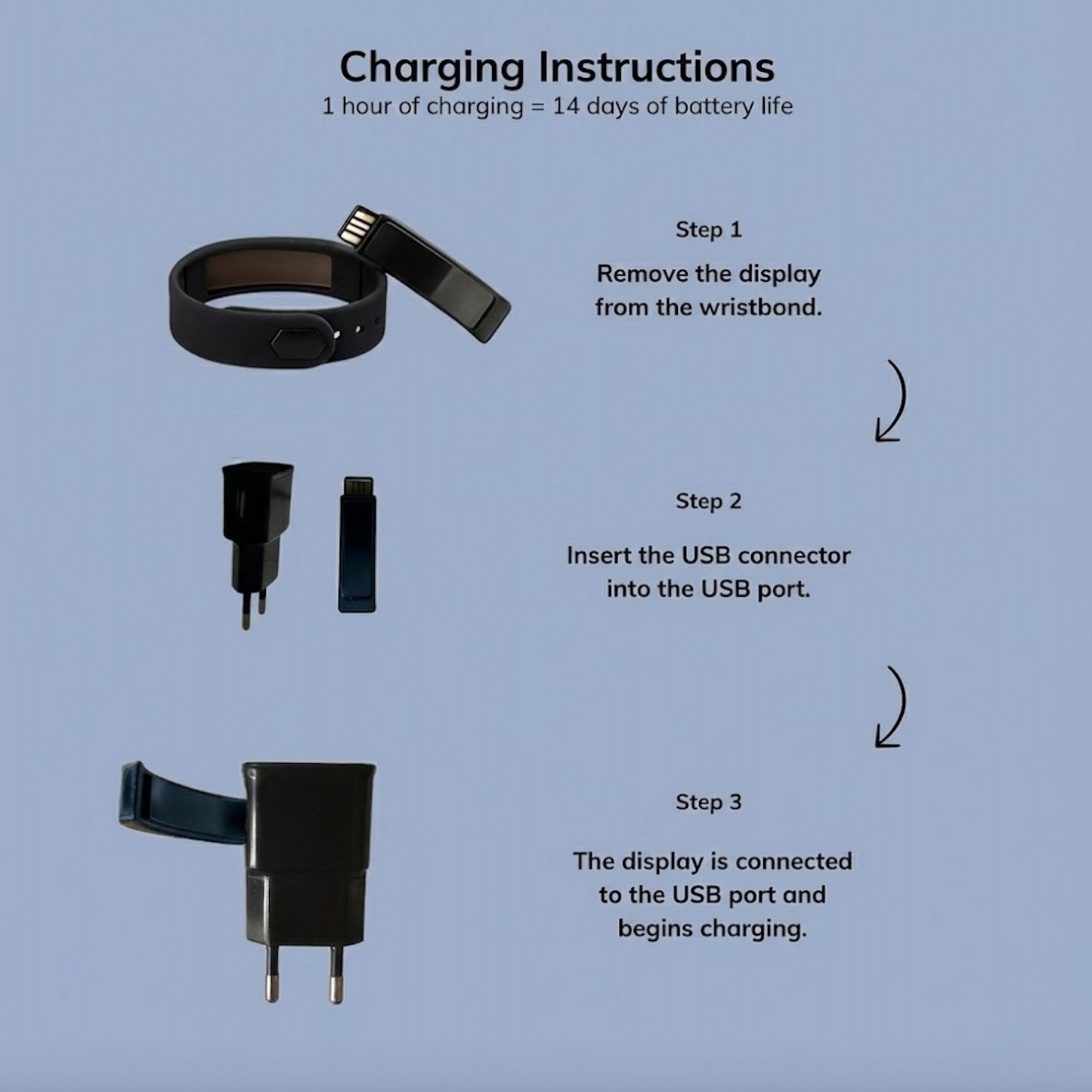
Charging instructions
To check the battery level of your FitSleeper, press and hold the button for 3 seconds while the device is in idle mode. It will then display the percentage.